Paying AWS more than you should? Cost and security review — every week
And your account is probably more exposed than you think. Every Sunday you get one clear report by email: what's open, what's wasted, and what to fix first. No DevOps hire needed.
Why this happens in almost every account
Accounts grow, developers spin up resources "for testing" and forget them, and security settings drift with nobody watching — until the bill arrives, or an incident does.
Forgotten servers and disks
Idle instances, unattached volumes and old snapshots you keep paying for every month.
Open doors
Ports open to the whole internet, years-old access keys, users without MFA and public buckets.
Surprises found too late
Cost spikes and unusual activity show up at the end of the month instead of the same week.
Two parts, one page, every week
🛡️ Security
- Root account and users without MFA
- Old or unused access keys
- Security groups open to the internet (SSH, RDP, databases)
- Public S3 buckets and snapshots
- Missing encryption on disks and databases
- CloudTrail and GuardDuty — enabled and configured?
- What's new since last week
💰 Cost
- Weekly spend and trend vs. last week
- Cost anomalies by service
- Under-utilized instances — rightsizing advice
- Orphaned volumes, IPs and snapshots
- Savings Plans / Reserved Instances coverage
- Estimated savings on cost findings
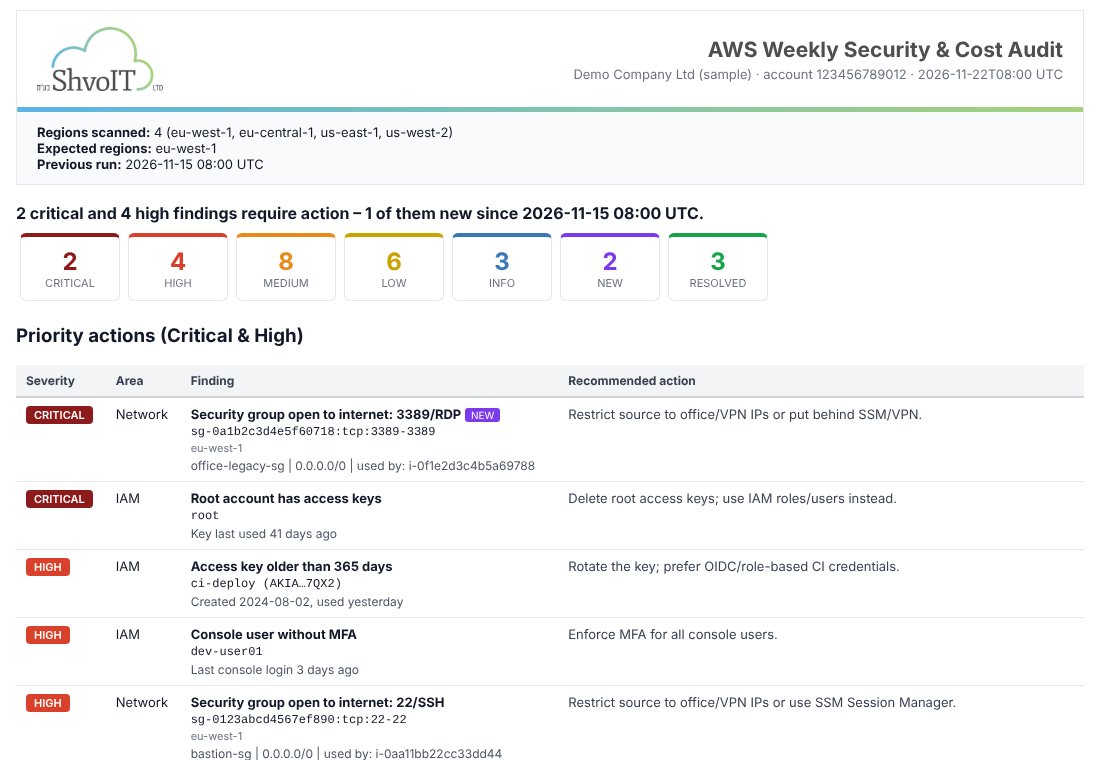
This is what lands in your inbox every week
A summary at the top, findings by severity, what's new and what was fixed since last week, weekly spend, and a prioritized action list.
- A clear recommended fix for every finding
- Trend over time — see the progress
- Estimated savings on cost findings
How it works
Connect in one click
You deploy a single template that creates a read-only role. We can't change anything or read your data.
Automated scan
The system scans your account (or several accounts) every week.
Report by email
Every Sunday — a clear report with priorities.
Monthly call
Once a month we go over the findings together. Want us to fix them? We're here.
Free AWS review — within 48 hours
A one-time scan of your account and a 30-minute call on the 5 most important findings, including estimated savings. No commitment.
- Read-only access — remove it right after if you like
- You keep the full report, even if you don't continue
- Works for a single account or AWS Organizations
FAQ
Is it safe to give you access to our account?
Access is through an IAM role with read-only permissions that you create and can delete at any time. We can't modify resources or read the contents of your files and databases.
We already have a DevOps engineer. Why do we need this?
The report doesn't replace them — it gives them (and management) a consistent weekly picture without spending time collecting it. Most teams are busy building, not auditing.
Does the report change anything in the account?
No. It only alerts and recommends. Fixes happen only with your approval — by you or by us.
Is there a commitment?
It's a monthly subscription. Start with the free review and decide once you see the value.
Do you work with companies outside Israel?
Yes. We're based in Israel and work in English and Hebrew; the service is fully remote.